Hello Team! Hope everyone is doing alright.
I followed the steps provided in this topic [Connecting to oracle database] and I was indeed able to make a TNS connection to work. Nice
However, I have a couple of questions for when we have TNS_ADMIN environment USER-only variable set.
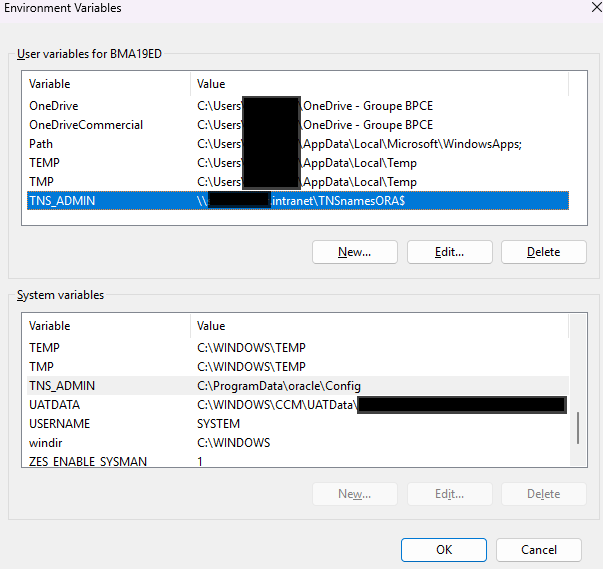
Consider the snapshot:
From it, we can see that there are two TNS_ADMIN environment variables defined:
• one is USER-only variable, and it points to a network path. Said path contains the Company's DATA_SOURCES' connections definition (a tnsnames.ora file), which is maintained by the relevant Team;
• the other is a SYSTEM variable, and it points to a local path. Said path can only be reached/accessed by admin users - which us, regular users, are not.
-- That said, I am unsure if there is or there is not a tnsnames.ora file there, nor contents of it. Not even replace the existing file (if any) by the one that exists on that good network path.
-- Hence we create a TNS_ADMIN user-only variable.
Questions:
(1) Can I make use this USER-only TNS_ADMIN environment variable when setting up ORACLE TNS connectors on EasyMorph?
(2) Does EasyMorph looks into environment variable at all when assessing TNS connection types?
Context:
The questions arise because when I try to setup an ORACLE TNS connector, it only works if a DATA SOURCE variable is added, as suggested by that post (the link above)
In another words, using the same credentials (user and pass) and NETWORK_ALIAS, I can only successfully connect if I have the DATA SOURCE variable set on EasyMoprh, even if the DATA SOURCE variable content is a direct CTRL+C>CTRL+V from the tnsnames.ora file that the user-only TNS_ADMIN variable points to.
Hello @Felippe.Costa,
Native Oracle connector in EasyMorph uses ODP.NET Managed Driver internally. And that driver takes TNS_ADMIN environment variables into account. A user variable should take precedence over a system variable with the same name. You can check it by executing the "Run program" action with the "Arguments: Text" option set to echo %TNS_ADMIN% and the "Capture output" option checked.
Please note that ODP.NET supports several ways to define TNS_ADIMN, and some of them will take over environment variables. For example, you can specify TNS_ADMIN in a connection string via the "Custom properties" tab in the connector settings. And the driver will use that value to search for the tnsnames.ora file.
You can check the precedence order of different ways to set TNS_ADMIN value here: Configuring Oracle Data Provider for .NET
But please note that Oracle's documentation on ODP.NET sometimes doesn't match the actual behavior.
Hello @andrew.rybka !
Hope all is well.
First of all, thanks for answering 
[echo %TNS_ADMIN%] captures the TNS_ADMIN environ-variable defined at user level, which is nice!
With that in mind, did some tests and here are my findings (hope it helps):
(1) I copied the network tnsnames.ora to my PC, to C:\Users\myUserName\Desktop\tnsnames directory;
(2) I re-set the TNS_ADMIN environ-variable to my account (user level) to the above directory;
(3) Tried to connect to the intended alias and... as before... no success
(4) removed from my local tnsnames.ora file all other aliases other than the one I want to connect;
(5) retried to connect and ... this time... it worked
Strangely enough, the original tnsnames.ora is used in SQL Developer without issues 
That then made me consider: Could be related in how the original file is interpreted by/parsed to Easymorph?
Like, Easymoph reads a tnsnames.ora that isn't effectively what's supposed to be due to some parsing issues.
I've looped through it and couldn't find any special characters that could possibly justify this behavior though
Is there a way of "retrieving" the tnsnames.ora Easymorph 'is seeing/reading' somehow?
Thanks for the support Andrew.
Kindly, Felippe Costa
Hello @Felippe.Costa,
Had to research this a bit more.
I would like to emphasize that tnsnames.ora files are parsed not by EasyMorph code, but by Oracle's ODP.NET driver, which is shipped with EasyMorph. We have a very limited ability to affect the internal processes of that driver.
While there is a way to make that driver write a log that shows which tnsnames.ora is being used, the corresponding setting is application-wide. Because of that, we can't expose that setting in a connector configuration. And we don't think that it's feasible to add such a specialized option to the application settings.
I have tried to configure two different TNS_ADMIN folders in different places and tested the following cases:
- The
tnsnames.ora with higher precedence has a syntax error; the second file has correct syntax
- The
tnsnames.ora with higher precedence doesn't have the requested TNS; the second file has that TNS
In both cases, according to the logs, the second file was found and read by the driver, but its content was completely ignored when resolving the requested TNS name.
I also tried adding different special characters to the tnsnames.ora file with higher precedence as an attempt to make the driver skip that file, but with no luck.
As for why it works in SQL Developer, but not in EasyMorph: I assume, that SQL Developer uses the standard tnsnames.ora parser, written in C. And ODP.NET driver uses its own parser, written in C#. The latter is not as "forgiving" as the former. Is it possible for you to share the problematic tnsnames.ora file with us? Maybe I can spot the possible source of this issue. If so, please send it to support@easymorph.com.