Every now and then I come across a customer who has created an EasyMorph expression comprising a large number of “IF” statements or functions nested inside each other. Something like this:
if([ProductGroup]="Chess", "Board Games",
    if([ProductGroup]="Monopoly", "Board Games",
        if([ProductGroup]="Mouse Trap", "Board Games",
            if([ProductGroup]="Uno", "Card Games",
                if([ProductGroup]="Playing Cards", "Card Games",
                    if([ProductGroup]="Playing Cards", "Bikes, Scooters & Karts", "Other")
                )
            )
        )
    )
)
Slap this in a “Calculate new column(s)” action and you have your additional data field.
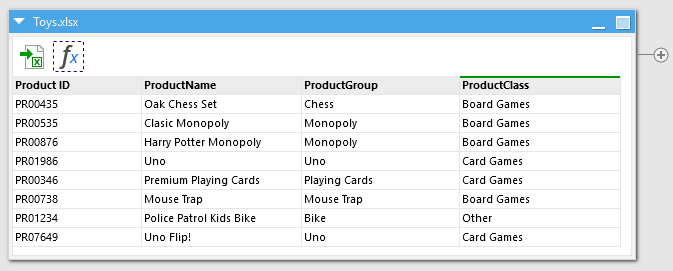
There is nothing technically wrong with doing this approach and it will achieve what you want. But the above is just a small example and I’ve seen expressions comprising several hundred nested IFs. Trying to update them or picking them apart when something isn’t working becomes a time consuming job.
An alternative way to achieve the same result (with a lot less headache) is to create a lookup table containing the mappings. You can use any file format or even a database table to hold your mapping - whichever is the easiest for you to maintain.
| ProductGroup | ProductClass |
|---|---|
| Chess | Board Games |
| Monopoly | Board Games |
| Uno | Card Games |
| ..... | ..... |
We can then load this lookup table into our EasyMorph workflow and use the “Lookup” action to use it to add the additional column to our data table:
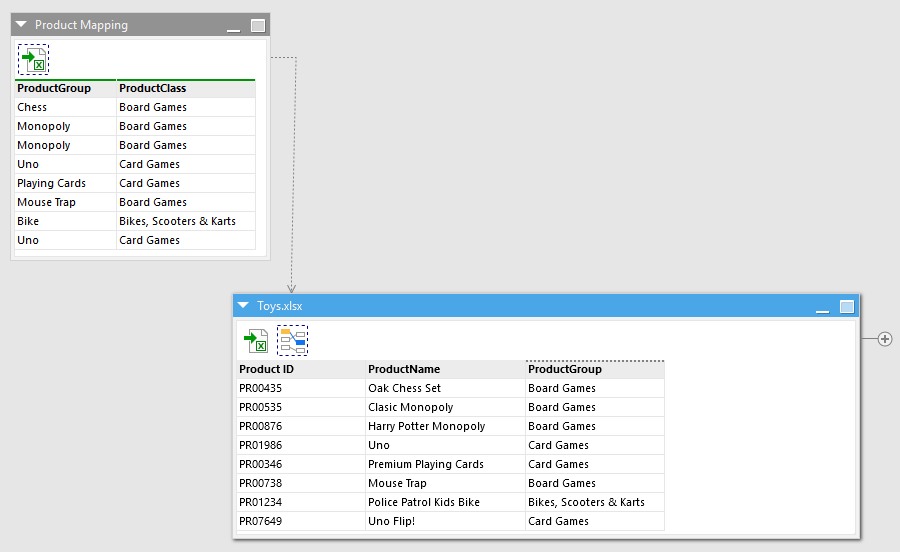
There’s no notable performance difference between the 2 methods, and updating a table in a CSV or Excel spreadsheet is a lot simpler than trying to wrangle hundreds of nested IF statements and to work out where you might have missed a comma or a bracket.