Hi,
I'm getting the following error when using the "File command" with the command "Unzip archive":
Error: File has wrong format. A local file header is corrupt.
A local file header is corrupt.
Source: action "File command", module "Module 2", table "Table 1"
I've inspected the file with WinRAR and with the windows built-in ZIP functionality, and both are able to process the file without issues.
The file contains confident information, so I cannot upload it to the public internet. I'll share an encrypted link via e-mail.
Cheers
Hi @Sir-McNeil, most likely, it's a 7zip file or some other archive format with incorrect extension. We'll wait for the link to check the file out.
Thanks for the pointer, @andrew.rybka. I tried changing the file extension to .7z, .gz and .rar, but no dice.
I sent the file to @dgudkov, as I don't have your e-mail address.
EasyMorph supports only "true" zip archives. As a workaround, you can use the Run program action run a third-party utility to unzip the file.
Please also send the link to support@easymorph.com
Hi @Sir-McNeil,
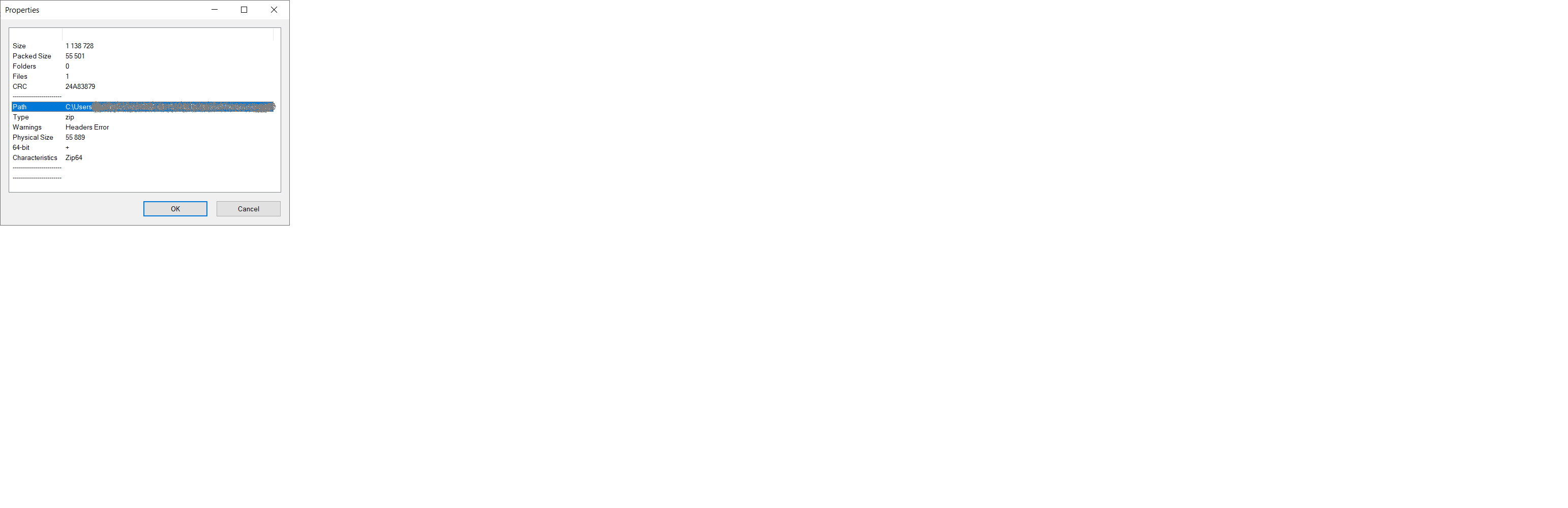
Thank you for the file. The file has Zip64 format (Zip format extension for files bigger than 4Gb) and some issues with headers:
Looks like the issues with headers are not critical, and other tools can ignore them. But the library, used internally by EasyMorph to unzip files, is not as permissive and fails when it encounters an incorrect header. Unfortunately, the library doesn't have an option to change that behavior. So the only currently available workaround is to use the "Run program" action with a third-party utility program.
The good news is that the next EasyMorph version (6.0.0) is able to unzip this file because it uses a more modern version of the .NET platform, which the library in question is part of.
P.S. I have deleted the file that you sent us.
1 Like
Thanks. I will use the "Run program" action for the time being.