Send a mail with parameter in a body

with easymorph I created the following actions, 1-List of files with Full path and modify date

2-New column called UPDATE : If modification date file point 1= today new column with the value "UPDATE" or "NO UPDATE"

3-New column called LOG: Concat Path file and new column at point2 .

Example: c:\test\file_test1.csv – NOT UPDATE
C:\ test\file_test2.csv – UPDA TE

Now, I'd like to send the new column created at point 3 in the body of the email. How can I d o that?

Thanks so much for support

Stefano

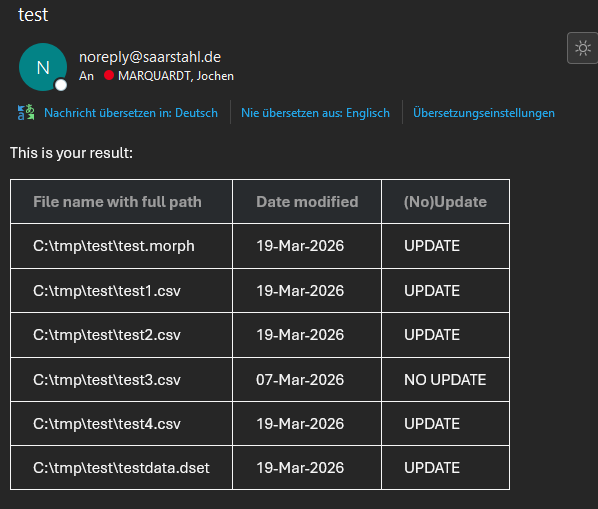
Is this your desired result:

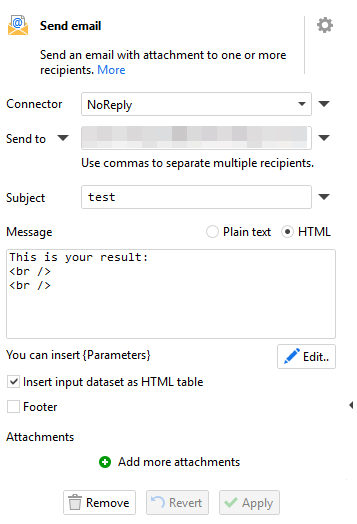
You can use the attached example. Just change the connector.

The trick is to switch form Plain to HTML.

test.zip (2.8 KB)

1 Like

Hi Jochen,

It was very helpful and works.

I'd like to ask you something: you calculated the (No)Update column, but if I wanted to just include this value in the body of the email, would that be possible?

Thanks so much for your help.

Regards

Stefano

I’m not sure if I got what you mean:

test.morph (7.3 KB)

In this updated version, there are three options:

  • Show only the file path and whether updated or not (without the timestamp)
  • Show only the updated files
  • Show only whether any file changes happened and send the mail only in case of any updates

Hope that at least one oft these options fit for you (or maybe a combination of it).

Happy morphing :slight_smile:

Jochen

Do you mean you wish to include a single value (i.e. the value of column XYZ row 1) in an email body such as:

To Bob,
Here is some long text including a {value} as part of the text.

From
Dave

If so then you would need to move the email sending to a separate module and to pass the calculated value to the module as a parameter. You can use parameters in the email body by wrapping them in curly braces { }
1 Like

Thanks everyone for your help. Goal achieved.

2 Likes