The structure uses a call to generate a temp key and then uses the temp key (session) to extract data
Can you please elaborate - what's your question exactly?
how do I initiate the call and generate and get a session, then use that session token to retrieve data. I have it working in Postman
I’m not familiar with the Sage API but a good starting point for working with APIs in EasyMorph is to watch our recent webinar on the topic: EasyMorph | Webinar: Connect, Automate, and Scale with APIs in EasyMorph
Thank you Matt. I’ve read docs and watched videos, it’s simply not clear.
No problem, let’s try and get it working. As I said, it’s difficult to give you the exact steps as I don’t know the specific API or have access to it. But I’ll try and talk you through the rough steps. The fact you have it working in Postman means you have all the info needed.
Firstly, we need to make a request to the API to authenticate and get back the session key. To do this:
- In EasyMorph, set up a new connector of the type “Web location”. You will need to configure it with the base URL for the Sage API and the relevant authentication.
- Now create a new project in EM and add the “Import from Web API” action. Set it up to use the connector you created. You’ll need to also configure the path, etc to the specific endpoint to get the token.
- When you run the action EM should make the same request as Postman and get back the token. How the API passes this back I obviously don’t know, but the most common would be for it to send the token in a JSON or XML response. If so, EM will try and parse the response automatically and split all the passed JSON/XML into a tabular form. Hopefully you’ll have a single row of data and the token is in one of the columns.
If you are able to get this part working first then the next part is to make another call using the token:
-
You may be able to use the connector you created in the first part for requests using the token or you might need to create another. Without knowing the authentication method of the API I can’t say for sure.
-
In the same table, add another “Import from Web API” action. Set it to use either the same connector or a different if you had to create one.
-
In the config for the action we need to pass the token. How it needs to be sent will depend on the API but commonly it will be as a parameter or a header field. As you have it working in Postman you should hopefully know. As an example, if it needed to be sent in a header field called “token” you configure the action according and then in the value, select the option to use “First value of column”. Then set the column to whichever had the returned token in it.
-
If you then run this action you should hopefully get back data from the API. As before, assuming the data is passed back in JSON or XML then EasyMorph will parse it for you into tabular data.
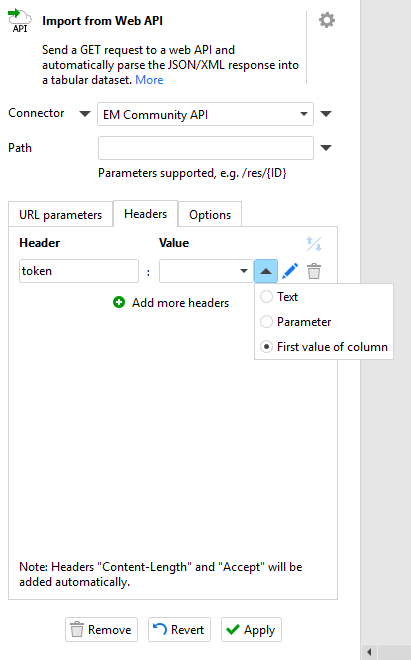
Hopefully this makes sense. If you’re still stuck, drop me a private message and we’ll arrange a call to walk through it.
Thank you for the details, capturing the Session token remains an issue. So hopefully, someone who has successfully been able to navigate Intacct will reply. Appreciate your insights, they are helpful
I looked at Sage Intacct API documentation and I see that it uses the OAuth 2.0 authorization protocol. EasyMorph supports this protocol out of the box. It means you don't need to handle session tokens (temp keys) - EasyMorph handles them automatically for you every time you query the API. EasyMorph supports both OAuth flows available in the API - the "authorization code" flow and the "client credentials" flow, including support for PKCE.
There is a good chance that if you configure the Web Location connector as per the API documentation, it will just work.
If you try and still can't make it work, feel free to send me the credentials for a test account in a DM. I'll try to use them to configure the Web Location connector to connect to the API.