Hi,
Since your last fix, everything has been working properly, and I thank you for that.
Unfortunately, since the upgrade from Salesforce to Winter '27, a new problem has arisen.
The token is not being renewed again.
The conditions are the same as in my previous messages (see Salesforce “Session expired or invalid” thread)
In the Salesforce connector, after a while, if I click on “Quota,” I get the message: “Error: Refresh token invalid. Try re-authorizing the data connector.”
And unlike the previous issue, if I click on “Test,” I also get an error message: “Error: Authorization is not valid.”
Can you look into this issue?
Hello, @pequichsoef !
Could you please send us detailed debug log?
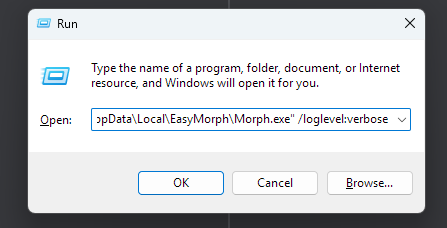
To start detailed debug logging you need to re-start Desktop and add /loglevel:verbose
You can do it via Run window (Win+R) and insert there following command:
"C:\Users\your user name\AppData\Local\EasyMorph\Morph.exe" /loglevel:verbose
This is the default path to EasyMorph exe file. If your Desktop is installed in alternative folder, please put the correct path.
After EasyMorph is started, try to reproduce the issue. Click "Quota" and "Test". Try to re-authorize the existing Salesforce connector, or create a new one and authorize it.
Then find the latest Debug log
(default path is C:\Users\your user name\AppData\Local\EasyMorph\Debug Logs)
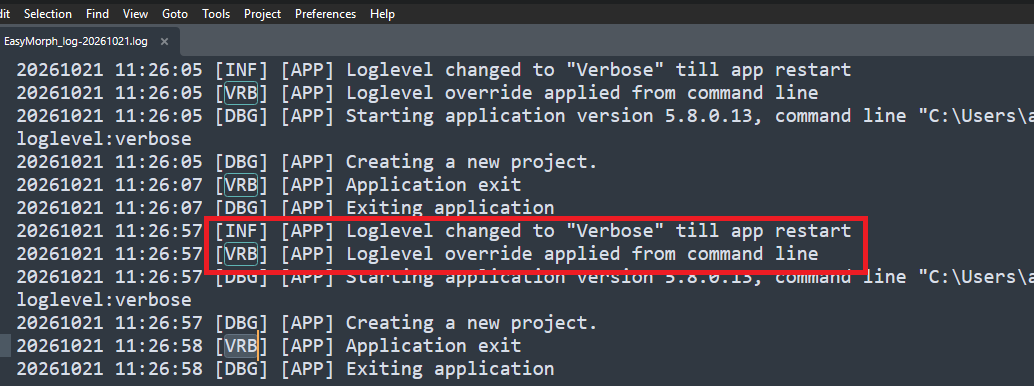
Make sure it is detailed debug log, there must be text: "Loglevel changed to "Verbose" till app restart" (see attachment)
Send the log to us via e-mail support@easymorph.com
@pequichsoef we have downloaded the log file and deleted the post with it for security reasons.
Best regards,
Denys Onufriiev
Hi @pequichsoef
Apparently, there are indeed some updates on Salesforce side that may explain what you're seeing.
From now on, their documentation says that
If someone tries to use a refresh token that’s been rotated out, Salesforce invalidates the current refresh token and any associated access tokens.
In other words, a single refresh attempt with an outdated refresh token also invalidates the current, valid one, and the connector has to be re-authorized.
That's... unusual, to put it mildly. Most OAuth providers simply reject the outdated token.
This is a trivial situation and it may happen if workflows run in parallel, or for example if a workflow runs and someone interacts with Salesforce connector dialog or action UI etc - due to local cache being present. Normally these situations are recoverable since when EasyMorph gets 401 on refresh attempt, it goes to the central storage for a fresh token - in case theres one - and retries the attempt.
With Salesforce, now, the refresh attempt itself apparently can kill the live, fresh token present in the repository.
We haven't been able to confirm that this is what happened in your case, because your log starts after the token had already become invalid. But at least it matches both the symptoms and Salesforce's documentation.
Preventing this in every case may be hard, but we'll think of a possible solution.
Until we release a fix, we suggest:
Don't use the Quota button, and don't rely on the Test button.
Avoid running several workflows that use this connector at the same time...
If the connector stops working, re-authorize it in the connector dialog.
It would also help to know:
Is "Enable Refresh Token Rotation" checked in your External Client App's OAuth policies?
Do your workflows themselves fail, or only the Quota and Test buttons?
Do any of your workflows run Salesforce actions in parallel, or run at the same time as another workflow that uses the same connector?