Hi,
Sometimes, EasyMorph changes automatically format of a column.
In my case, I do have some columns with french ZIP codes (5 figures, example 21000, 21121, and so on). And EasyMorph tends, randomly, to convert those columns to dates.
Can you advice on how to handle such situations, if this not a bug ? Any best practice ?
Thanks and regards
Hi @David_Juras ,
EasyMorph detects format based on numeric ranges, since dates are represented as numbers. Depending on the values in the sample, it may or may not decide that the column likely contains dates.
Note that the column format is used for visualization; it does not change the underlying data in any way. You can override detection by selecting the format manually from the drop-down menu above the workflow editor. I would emphasize that changing the column format does not change the data, so neither autodetection nor manual format selection actually converts anything.
Hi Vlad.
Thx. However as I have a CSV output for this data, it leads to issues in other workflows in other systems as CSV then embeds dates rather then zip codes. Any advice ?
Cheers.
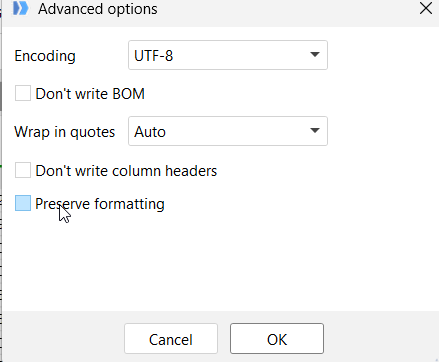
There are a few ways to fix that. Probably the easiest one is to uncheck the 'Preserve formatting' option in the advanced export settings.
Alternatively, you can convert Zip column to text before export using the 'Convert data type' action and specifying the number format as 'No format'.
Changing the field format manually in the application and then saving the workflow should also work, but it is less reliable, as the field can be modified later.