As we get inquiries to clarify the way AI-powered features work in EasyMorph from a privacy viewpoint, I've made this post to provide more details.
- Do you have any schema that can help to understand how it works. Even a simple diagram with your AI Service and one Easymorph desktop. If the data passed to the service is stored, can you mention it ? Where is it stored ? Do you use any solution in the cloud under the hood ? OpenAI ? Do you have any documentation that can help to understand, from an security expert perspective ?
- Is it possible to block it, not only to disable it by user ? What network flow we would have to block if a software block is not possible ? As users still have the possibility to install Easymorph on their own, what possibilities do we have to block it ? In case the security refuses ?
As of the latest version (v5.9.8) at the moment of writing this post, only EasyMorph Desktop has AI-assisted features, as follows:
- Expression generation
- Extended action search
No other application from our product line, including Server (Hub), CLW, or CSViewer use AI services as of now.
The communication works as displayed in the following diagram:
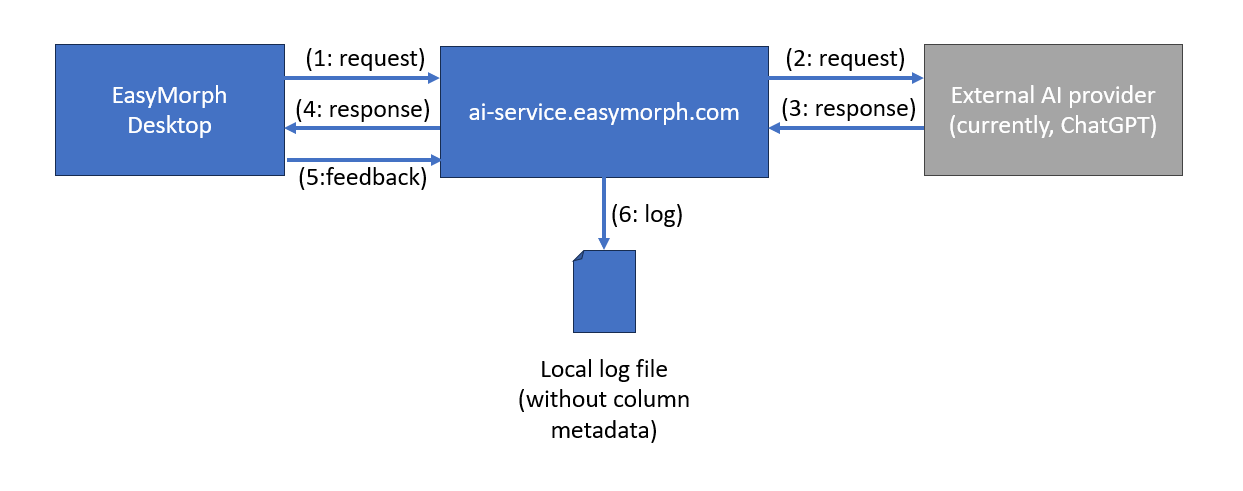
Here is a detailed explanation of the steps:
Step 1: request
The user prompt and (in case of expression generation) a list of column names (but not column values!) are packed into a request that is sent (over SSL) to our AI service at ai-service.easymorph.com. We intentionally made a separate API endpoint for AI services to make it possible to block all AI-assisted features with a firewall rule without blocking other functionality of EasyMorph.
Search requests are cached in memory by our AI service to avoid repetitive identical requests.
Step 2: request
The request is transformed into an API call to a cloud-based 3rd party AI provider. Currently, it's ChatGPT by OpenAI. The architecture allows changing the AI provider in the future, should the need arise, including the option of self-hosting our own AI provider.
Step 3: response
The AI provider returns a response.
Step 4: response
Our AI service validates the response by applying formal rules. If the response is valid, it's passed to the calling Desktop.
Step 5: feedback (optional)
Optionally, if the user presses the "thumbs up" or "thumbs down" button in the expression generator to approve or disapprove the obtained result, this feedback is sent to the AI service.
Step 6: log
User prompts (without column metadata or any other details that would allow identifying the user) and user feedback are stored in a local log file for quality analysis by select EasyMorph employees.
Privacy
Using AI-assisted features in Desktop requires explicit opt-in. It is also possible to opt out at any moment in the application preferences (menu About).
Currently, there is no centralized setting (e.g. in the Server/Hub) that would allow blocking AI features in all connected Desktops. Also, it's not possible to bring and use your own API key for the service.
To block any use of AI-assisted features in EasyMorph, block the domain ai-service.easymorph.com in your firewall. It won't affect any other capability of the application.