EasyMorph is unable to properly manage database connections to Oracle Database, leaving idle connections in an open state. These orphaned connections are accumulating and exhausting the available connection pool limit, causing subsequent connection requests to fail.
We are looking into this. Which connector type are you using - native or ODBC? And which DB-related actions do you usually use with Oracle?
We use the native connector and generally we have read actions.
Server edition: Enterprise
Server version: 5.9.6.5
It looks like a connection pooling issue, which is turned on by default.
The most straightforward way to deal with this is to limit the number of connections in the pool and limit the lifetime of each connection by setting the Max Pool Size and Connection Lifetime custom properties:
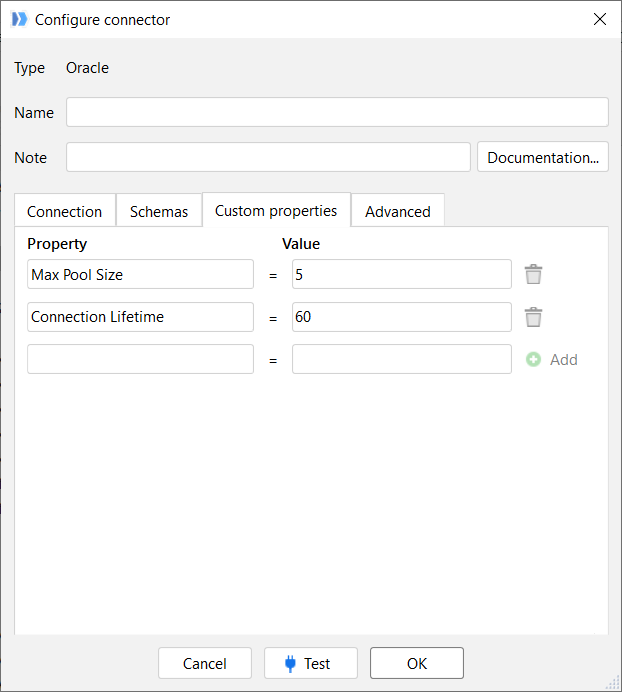
But it might negatively affect performance in some cases.
If you would like to fine-tune the behaviour of the connection pooling, you can refer to the documentation on Oracle Data Provider .NET (used internally by the native Oracle connector in EasyMorph): https://docs.oracle.com/en/database/oracle/oracle-database/21/odpnt/featConnecting.html#GUID-AAC5352A-83F2-483B-A681-93A5200CA83A
The link might open an incorrect chapter. Search the page for "Connection Pooling" in such a case.
We have disabled connection pooling as indicated in the documentation.
Currently, we have the following flag set in the Connector’s Custom Properties tab:
Pooling = false
And the following configuration in the Advanced tab:
SQL SELECT Timeout: 1800 seconds
SQL Command Timeout: 600 seconds
Export Timeout: 1800 seconds
Please keep in mind that disabling connection pooling will decrease import performance even when you are importing data from only a single table (because the "Import from database" action makes three queries during execution of the action: columns list, column comments, and the data import itself).