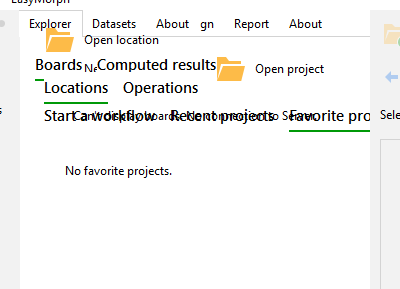
We are new to installing easymorph. We are adding it on a PC for users to access. The menu bar within application has shifted, not displaying correctly. I have added screenshot below. We have uninstalled and reinstalled. Any ideas?
@CBrammer, can you please tell me which EasyMorph version you are installing?
It’s Version is 5.9.8.10.
@CBrammer, we were able to replicate the issue. Possible reasons for this to happen: The EasyMorph folder is renamed, or the config files are deleted. Or EasyMorph doesn't have permission to access the config files. Have you done something like that? In any case, a clear reinstall should help, and we will look into it and fix this issue if the fix is feasible.
Hi Carey,
Please make sure you install EasyMorph in its default configuration. Also, it could be that your anti-malware software is blocking the installation and doesn't allow the EasyMorph installer to create the necessary config files. If re-installing doesn't help, try disabling your anti-malware for some time and installing EasyMorph again.
The application is installed daily by dozens of people, and nobody reported that problem so far.