Is there a way to import multiple tables from a SQL database using a single action/import step?
Currently, for each table I need, I do separate “Import from Database” Queries. I’m looking for a way to do this in a single shot.
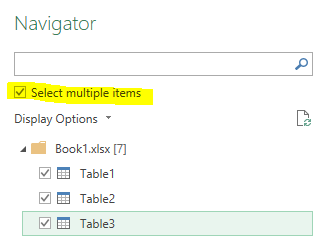
One of the few things I miss from Power Query was this exact option. The example below shows importing multiple worksheets from a .xlsx - but same functionality applies for SQL pulls.
Hi Aaron, there is no option for that currently. I see the convenience of it, however, I should note that the current way of loading several tables doesn't take much time either - just clone the import action and change the table name in the query.
You can quickly clone an action by pressing Ctrl and dragging the action outside of the table:
Put the list of the tables you want to import in a table then make an iterate to load all the tables one by one and consolidate them with the return of the iterate loop.
I often do that to collect te content of several tables for profiling purpose for example or to concatenate current and archive tables.