We have users in easymorph server that are not tied to an external identity provider (“Easymorph User” sign-in method). I can of course set, change, or delete their password for them as a server admin, but I don’t see any spot for them to change it themselves when they login as a non-admin, either from the easymorph desktop application, or via logging in under the server url in a web browser. If I don’t set a password for them they don’t get prompted to set one either upon trying to login the first time. Am I missing a permissions setting somewhere or is this really not possible? All we see when logging in is the normal selection for Spaces they have access and whatnot. I don’t want to be knowing their passwords, nor making them server admins just so they can set their own.
Hi @GDouglas and welcome to the Community!
Server users can't change their passwords, only Server admins can do that. It's a basic authentication mechanism intended for limited use and for the less capable Server editions. Since you have the Enterprise edition, I'd recommend using external identity providers (Active Directory or Microsoft Entra ID) for full self-service user management.
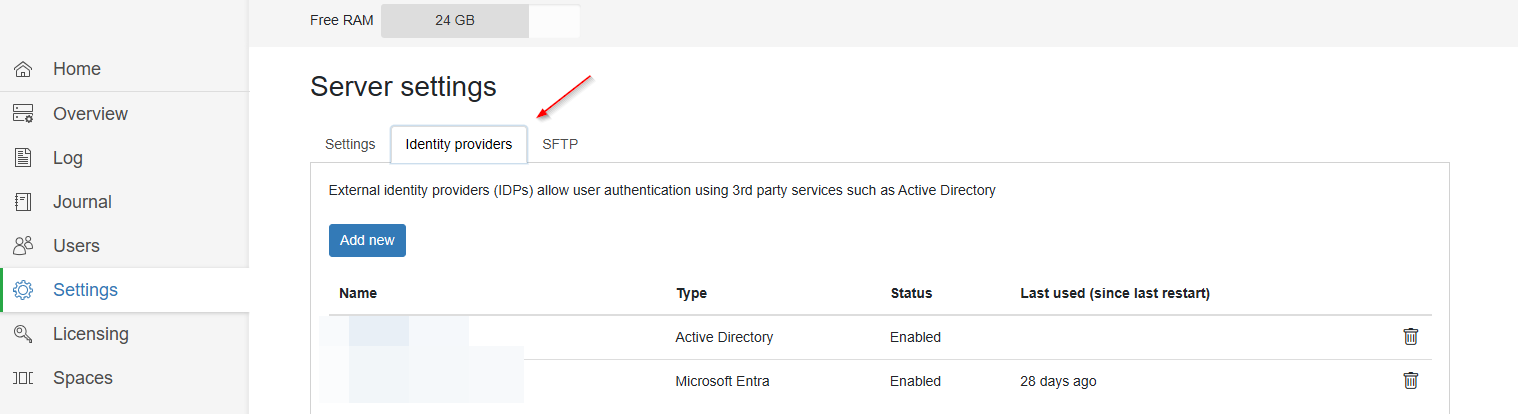
You can configure external IDPs in the Server settings:
Unfortunately our organization has two domains where our servers reside in one active directory, and the client devices our users are using are in a different one, causing a bit of issue when trying to get things working correctly (I know… I wasn’t there when it was set up, and it has to do with the way the entire organization is structured). It was a much simpler solution to use the basic authentication after trying for quite some time to get things working across domains. Using IDP from the AD that the server resides in caused the client devices to have issues both logging in with the correct domain name and getting the license correctly. The AD structure isn’t something our team has control over, so we resorted to not using an external IDP to avoid it.
If you use on-premise Active Directory, then yes, it won't work. However, if you use Azure AD (aka Entra ID) then you can create and use several identity providers of the "Entra ID" type.
We didn't want to create a fully-features user authentication systems as it's highly security-sensitive and also requires many policies to implement - password recovery, 2FA, password rules, password rotations, etc. Therefore we recommend to use external IDPs to manage many user accounts.
Do your employees use Microsoft or Google accounts? We plan to add Microsoft and Google as external identity providers.
We do use on prem AD, but yes we do have microsoft accounts, so maybe that will be our avenue to take once it’s added.