I'm using Import Excel Spreadsheet action to import XLSX files from an input folder.
Files can be present or not and absence of files is not an error condition because it depend when XLSX files arrive from the outside and when ETL is scheduled.
But when folder is empty EasyMorph always fire an error and (as far as I saw) there is no option to say: no files = no error condition.
Hello Eros!
Here's the configuration which may help:
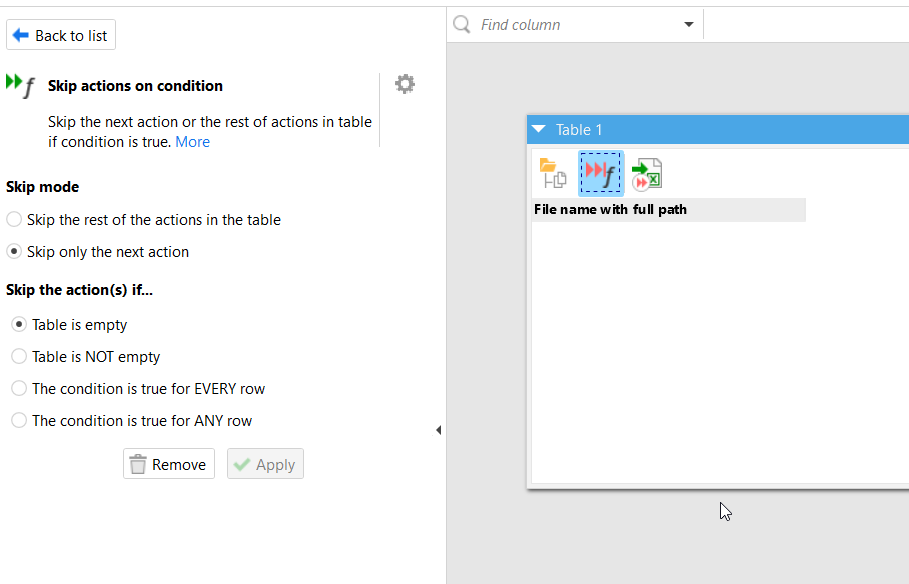
Put the action "List of files" where the source folder is set; it will create the table with names of all files in this folder;
Add the action "Skip actions on condition", select Skip mode you need (to skip the only the next action Import or all the following actions); select the condition for skipping - "Table is empty";
Add the action "Import Excel spreadsheet", set the option "Load files" in the mode "Load list of files".
Now, if the source folder is empty, the action "Import Excel spreadsheets" will be skipped without error and breaking the rest of workflow that you have after it.
This configuration is added in attached project.
We're glad to help!
There are no dummy requests when someone is learning. So please feel free to ask!
Good luck! And thank you for being with EasyMorph
When I need to load several files that may or may not be present, I prefer to use an import-file module. In the main module, I list the folder(s) to check and pass the filename to the import module through an Iterate action (with option "Iterate and append results" checked).
This approach allows you to use the "Collect errors and continue" option when a file is missing, while still preserving the error message, which helps identify the root cause of any issues.