Hi everyone!
I just found out what seems to be a bug since new version 6.1.0.3
I updated the server version not long ago, during summer season.
This job is working without issues since its birth almost 2 years ago.
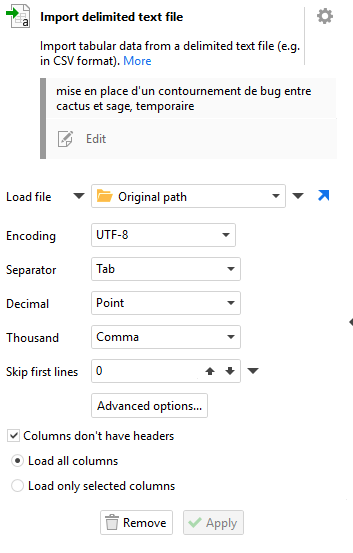
Problem is, the separator was changed to Space and one of the columns treated as a date instead of an amount. Issue was reported to me yesterday by the end user. I checked the server version, it was on 'Tab'. But when I tested it with a file by changing Load File value, the separator was immediately updated without asking.
Is it possible that it may "switch" when called by the server and opening a file ?
Thx for your inputs.
Hi @DamienFromFrance ,
Can you clarify whether the separator changed after editing the action or by itself? It should never change by itself if that specific action is not edited, so simply executing the workflow would not change it.
During action configuration, however, changing the file path in the Load File action triggers automatic separator detection based on a heuristic. For certain inputs, this heuristic can misidentify the separator. That is what happened when you tested it manually. There is currently no option to disable this heuristic.
Similarly, the numeric column format (date or number) is automatically determined based on the range of numeric values. This does not change the value itself, only how it is represented in the column. Once the format is explicitly specified by the user, it is saved in the project and will not be overridden by automatic detection.