Hi,
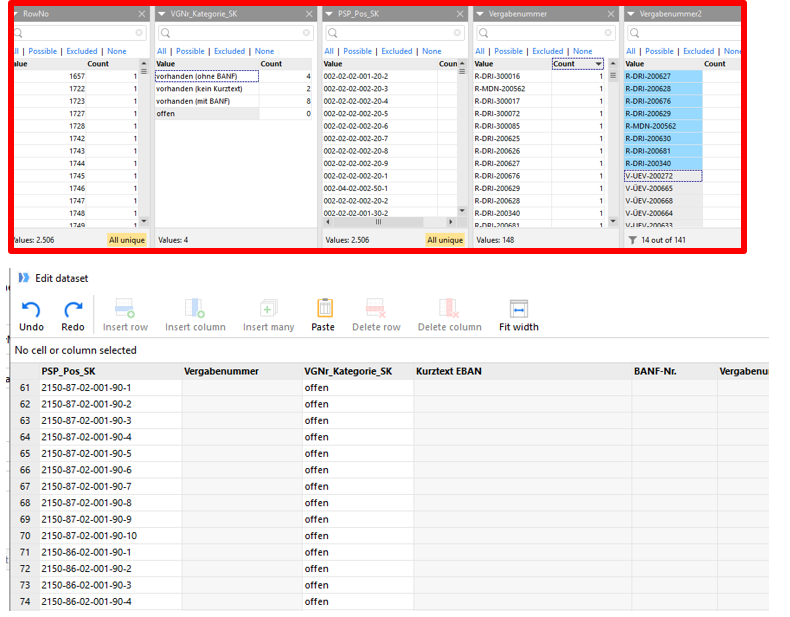
editing large dset files is very arduous, because you can only find the by scrolling to line number.
Would it be possible to provide the filter bar here?
Example:
regards,
Adrian
What do you want to find? I think a word might be missing here.
Hi,
in column No .. I thought that was clear.
regards,
Adrian
Ahhh. I think I get it now. You want to edit a .dset file (the same applies to editing a dataset that was created using the Sandbox action) by replacing/setting values in some column A for some rows. To speed this up, you want to be able to filter the displayed dataset on some other columns B and C.
I could see how that would be useful, especially for larger test datasets (I'm editing one right now, which is, thankfully, still manageable in size). The number of test cases doesn't tend to go down in time :/.
The workaround would be to
That's quite many steps for a few single value changes. If this came up often enough, I'd create an easymorph flow just to speed up the process of such edits.
Hi,
thanks for replay bur i think the best solutiuon would be to have Filters 
regards,
Adrian