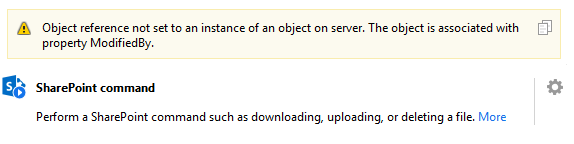
Our organization recently started copying our fileshare to SharePoint. I wanted to check whether all documents were succesfully copied in EasyMorph. However, for most folders I get an error when I:
- Try the "List files" command (screenshot);
- Try to download a file from the folder. In this case, the error already appears in the "Browse for file" window.
It seems like the error occurs once EasyMorph attempts to show all files within the folder. Curiously, I can succesfully download files from the folder by entering the path manually.
Sometimes the error references the property "ModifiedBy", like in the screenshot, but sometimes it mentions the property "Author" instead. This led me to suspect that some metadata that EasyMorph requires was not copied correctly. However, there are also some folders in the SharePoint site that do work regularly without any errors, even though these files also lack an Author in SharePoint. Futhermore, the field "ModifiedBy" has a value for all files in SharePoint. So it does not seem like the absence of these properties is the issue.
We have frequently worked with SharePoint connectors in EasyMorph and never got an error like this before. I'm not sure whether this has to do with the properties of the SharePoint site, an issue with the copying of the files or a bug in EasyMorph. As far as we can see, the SharePoint site and the files within it look perfectly normal. I saw a few other forum posts concerning the same error (but with differen causes) that were solved by bug fixes in new versions of EasyMorph, so I was wondering whether that would be the solution here as well, or whether we're doing something wrong. Any help is much appreciated!