Hi,
I have around x50 EasyMorph tasks running roughly every 30 minutes.
Within each EasyMorph scheduled task, an EasyMorph Server Command action, deletes a file after processing it.
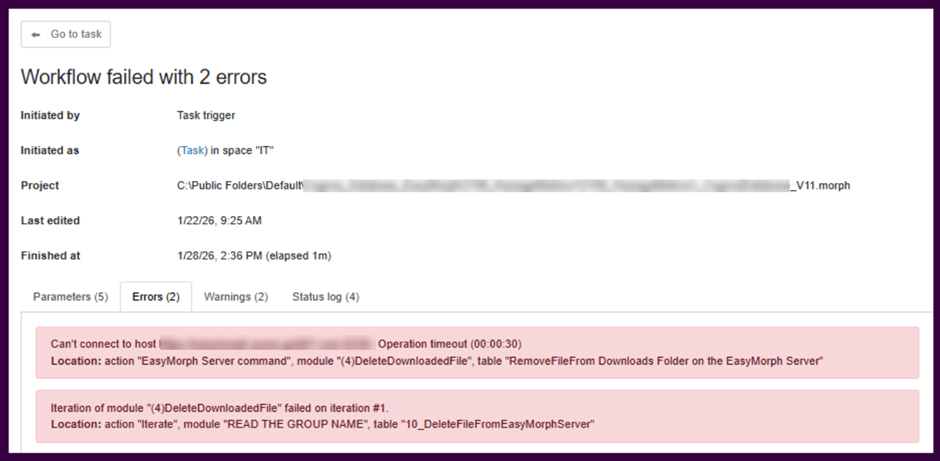
This works over 95% of the time however, we are receiving errors of the below format. The blurred out bit is our server’s url with the port.
Does anyone know why this might be happening?
Best
James
Hi James,
Thank you for reaching out.
Regarding the error: This error indicates that the EasyMorph Server Command action responsible for executing the specified operation was unable to establish a connection to the server within the 30-second timeout period. The root cause could be related to either network connectivity issues or server overload (insufficient threads available to process incoming requests).
To help us investigate further, could you please provide the following information:
-
Which EasyMorph Server version and edition are you currently using?
-
Which specific command(s) are being used in EasyMorph Server Command action? Are they executed in a loop?
-
Could you describe the nature of these tasks in more detail? Do they generate significant load on the server during execution?
-
Are these tasks running on the Default worker or a dedicated one?
-
Have you noticed any slowdowns in the Server WebUI while these tasks are running? For example, prolonged delays before pages refresh or render.
-
Even though the Server Command action connects to the same server it's running on, the request still goes through the specified URL. Is there a proxy or load balancer configured for that domain? This could affect how the server resolves connections to itself.
-
Is SSL enabled for the connection?
-
Could you send the Server's debug log covering the time interval from a few hours before to about an hour after this error occurred to the support email?
This information will help us narrow down whether the issue is related to network configuration, server capacity, or resource contention.
Hi, thanks for getting back so quickly. Answers are listed below with a “->”
Which EasyMorph Server version and edition are you currently using?
-> Enterprise v. 5.9.8.3
Which specific command(s) are being used in EasyMorph Server Command action? Are they executed in a loop?
-> "Delete" File. It will be one file per task that will be deleted. No Loops
Could you describe the nature of these tasks in more detail? Do they generate significant load on the server during execution?
-> comparing a CSV against an Easymorph dset and updating/bulk exporting the changes to Azure SQL server
Are these tasks running on the Default worker or a dedicated one?
-> They are running in a sperate space, not the default one
Have you noticed any slowdowns in the Server WebUI while these tasks are running? For example, prolonged delays before pages refresh or render.
-> No
Even though the Server Command action connects to the same server it's running on, the request still goes through the specified URL. Is there a proxy or load balancer configured for that domain? This could affect how the server resolves connections to itself.
-> Inbound traffic comes through a load balancer. This is the only server in the vnet though so it's not high through on the LB.
Is SSL enabled for the connection?
-> Yes
Could you send the Server's debug log covering the time interval from a few hours before to about an hour after this error occurred to the support email?
-> There's no log entry from the 28th when the error occurred.
Hi James,
Thank you for the detailed information.
Regarding the error frequency: You mentioned that the solution works approximately 95% of the time. However, given the volume of 50 tasks running every 30 minutes, a 5% failure rate would translate to roughly 120 errors per day. Could you confirm whether you are actually observing this number of failures?
Regarding the worker configuration: You mentioned that the tasks are running in a separate Space, but which worker is assigned to that Space? Typically, if a dedicated worker has not been explicitly created, the Space will use the Default worker, which operates in InProc mode. Given that you have an Enterprise license, a more optimal approach would be to migrate your existing Spaces to one or more External workers. This configuration provides better compute isolation, improved security, and increased reliability.
Regarding the load balancer: The issue here is that when the EasyMorph Server Command action calls the server through the load balancer URL, it creates a network loop: Server → Load Balancer → Server. Depending on the load balancer's configuration (timeouts, connection handling, keep-alive settings), this can introduce unintended side effects and intermittent connectivity failures. As a potential solution, consider either specifying localhost in the Server command`s connector settings, or adjusting your network routing so that the server can reach itself directly without passing through the load balancer.
Looking forward to your feedback.
Hi Constantin,
The error rate is more like 1.44%. 208 errors in the last 6 days
I will get back to you regarding the other points.
Thank you