Hi,
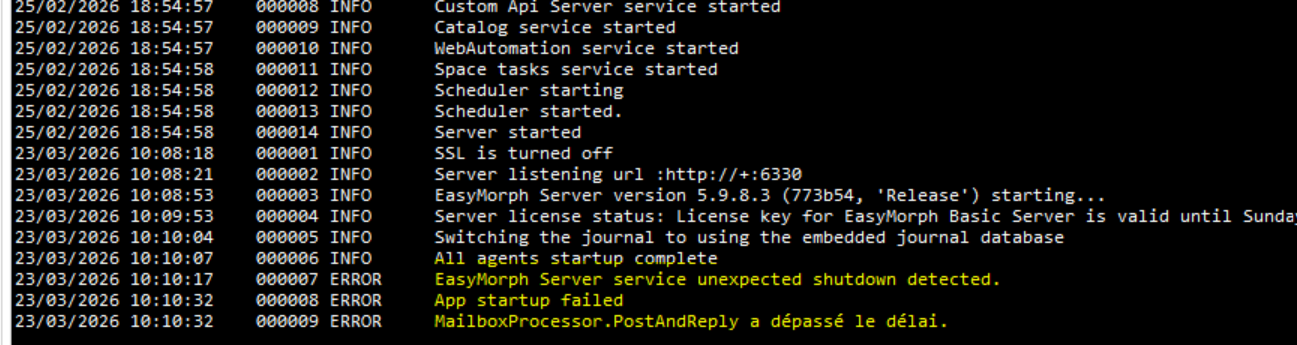
on an Hyper-V VM , service crashed at starting due to mailbox processing (see joined)
then if i stop and restart service,all is ok.
Is there any way to extend timeout of mailbox processor ?
Hi!
This error is not related to e-mail per se, it's internal generic workings of EasyMorph Server queues.
Could you send the debug logs that contain the error details (usually found in C:\ProgramData\EasyMorph Server\Logs\Debug log) to our support email as well?
Thank you for the logs @pequichsoef , we'll look into it.
@pequichsoef Thank you once more for the logs. One of the possible reasons for this behavior may be caused by occasional delay when EasyMorph writes/rotates its server log files. Could you please share:
- whether
C:\ProgramData\EasyMorph Server\Logsis on local VM storage or shared/network-backed storage, - what antivirus/EDR or backup software is installed on the VM and Hyper-V host,
- whether VM checkpoints/snapshots/backups ran around the incident time,
- whether anything tails or collects the EasyMorph log files,
- maybe Windows Event Viewer logs from the guest around the failure time, and Hyper-V/backup logs - if available,
- jic, free disk space and whether there are known storage latency issues on that VM
Hello,
Thank you for providing the debug logs.
The logs indicate that the initial server startup sequence takes significantly longer than expected. Normally, the initialization process, including thread creation, should complete in milliseconds; however, in this case, it took approximately 100 seconds:
23/06/2025 10:32:34    000001 INFO      SSL is turned off
23/06/2025 10:32:40    000002 INFO      Server listening url :http://+:6330
23/06/2025 10:34:18    000003 INFO      EasyMorph Server version 5.9.5.1 (97d59e, 'Release') starting...
During the subsequent server restart, this sequence executed much faster, within approximately 10 seconds:
23/06/2025 11:11:56    000001 INFO      SSL is turned off
23/06/2025 11:11:58    000002 INFO      Server listening url :http://+:6330
23/06/2025 11:12:06    000003 INFO      EasyMorph Server version 5.9.5.1 (97d59e, 'Release')
Considering the use of Hyper-V, the symptoms closely match typical scenarios involving CPU throttling due to low CPU credit availability or RAM overcommitment, leading to insufficient resource allocation to the guest virtual machine.
To investigate this further, please provide details about the current hardware configuration and resource allocation settings for this virtual machine.
Hi , As i’m in a group, i cannot provide all requested for security reasons.
but here are the main
16Go Memory,8 virtuals procs,free disk space 30Go,Trellix endpoint security,no backups around the incident time
but thanks to you, I already know that I need to check the performance of my virtual machine
Am I correct in understanding that your bare-metal server has 16 GB of RAM, yet you allocate the entire 16 GB to the guest system (as indicated by the logs)? If that's the case, the machine will inevitably face a critical shortage of memory.
Hi @pequichsoef
we've released a fix for your problem. Although we were unable to reproduce the issue, but are fairly certain of the cause - basically, we've downgraded the startup log access failure to a non-fatal one. That should help your case.
You can download the new installer from the EasyMorph site.
I’ve install new version
Thank you very much for your reactivity