Creating a Table via the Database Command action requires manual specification of the Columns, Data Types and (if applicable) Data Length.
Is it possible to develop this so you could parameterize all 3, so you could iterate through a list of new table names, each with different column names and bespoke data types and lengths?
For example, using EM we extract survey data via an API, resulting in:
A table of survey names
A table containing all variables for all surveys, with data types
A table of responses for all surveys
Once I’ve got these raw tables, I’d like to iterate through the Response table to:
Pass the survey name
Pass the survey variables (columns), data types and lengths
You should be able to do what you need as follows:
First create a table in the database using the Database command action using the "Create table” option. You’ll need to add at least a single column else most DB engines will error. Maybe just an “id” column. You don’t need to pass any data at this stage.
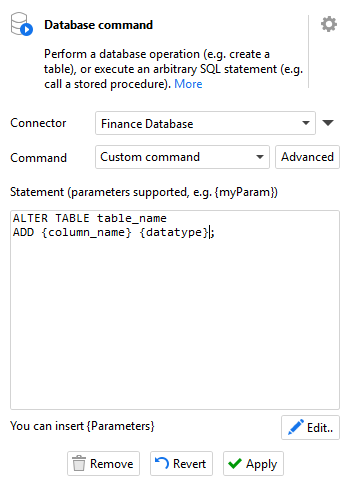
Next, you can still use the “Database command” action to add the required fields to the table. First, you’ll need to create a list of the field names and required data types. Then create a second module in the workflow (Lets call it “Helper”) and add 2 parameters for the column name and data type. Now add the Database command action and configure it to “Custom command”. This allows you to enter any SQL statement to be executed against the database, including altering a table to add fields.
Key is that you can use parameters in the SQL as shown above. Now in your main module, you can use Iterate action to loop through the list of fields and data types you created, passing them one at a time to the “Helper” module to be added as a field to the database table.
Once created you can export your data to the table as normal.