Hello Everyone,
I'm new to using CSV Viewer and just wanted to filter my data by Regular Expressions.
Although I am familiar with RegExp and seem to have the right Syntax, the filter doesn't work.
For example, I have a data column (let's say Column X) with possible values (123, 124 among others) and I need to match only cells with 123 and 124, the RegExp would be:
12(3|4){1}
Unfortunately this yields no results.
I wonder what I am doing wrong.
Hello @Pete_Wright, and welcome to the Community!
We are looking into this issue.
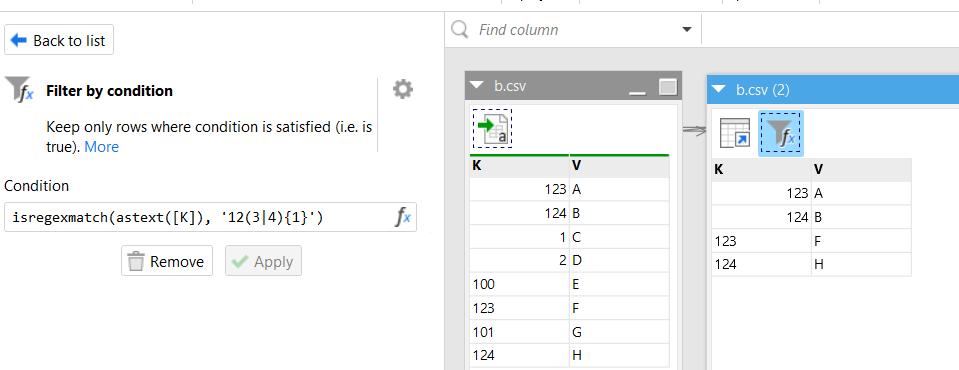
@Pete_Wright, looks like your values are numbers, but the regexp filter matches only text values.
Yes, the values in my data are in deed numbers.
Is there any other way to get the data filtered as stated above?
i.e. show only 123 and 124 amongst any other mixed values (which can be text or numbers)
Hi @Pete_Wright ,
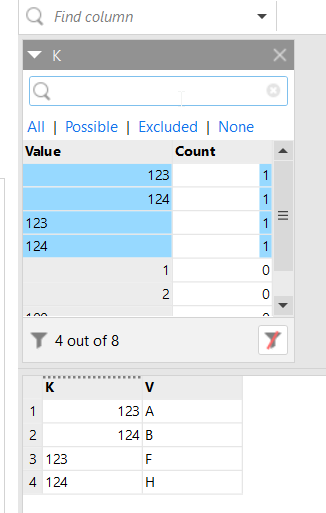
The easiest way would be to use the regular filter: search for 123, select it, then search for 124, select it, and apply the filter.
However, the best way would be to use the 'Filter by condition' action in EasyMorph. You can download the free version from our downloads page.
Thank you so much!
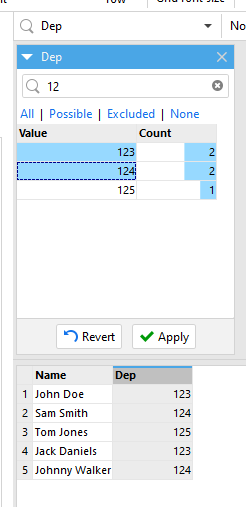
I found out when I type in "12" everything starting with "12" will be shown and I can simply select and apply the filter.