Hi everyone.
I have a similar problem to the previous one, but more complex. I have an Excel file containing a network path in column A and a file name in column B. I need to read all these rows until the end of the data and check that the modification date of each file is the same as today's date.
I then create a new log file, that tells me: File A - Updated, File B - Not updated, etc.
The file's content will then be a test email, and the subject line should also include a count of the out-of-date files.
Example of an email subject: Out-of-date files: 2.
Is this possible with Easymorph?
Hi and thanks, your example is clear but I can't adapt it.
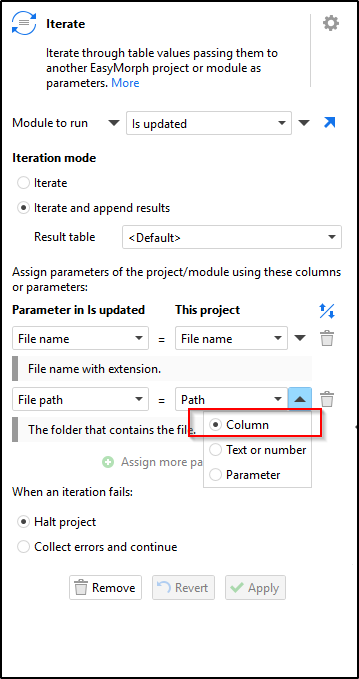
Question: When you call the ITERATE action and call the module, you pass two parameters, file name and path. However, when the action within the "IS UPDATE" module creates the "FILE_PATH" parameter, you specify a fixed string. Your desktop, however, in my case, should point to the path specified in the original Excel file.
For example, in target "FILE PATHS.xlsx"
I can have \path1\file1
\path1\file2
\path1\file2,
but it's never always just one path with a costant string.
The parameter value in the "Is updated" module is just a sample value. It gets replaced by the "Iterate" action under the hood when you run the "Iterate" action. This is how iterations work in EasyMorph.
Both file name and file paths are specified using columns from the original Excel file.
Sorry, I didn't explain myself very well. I understood the reading loop with iterate, and now I've added the extra "IS UPDATE" column to the Excel columns table. I'd now like to send the result in the body of an email—not the count, but the entire content. Example: c:\test\file1.xlsx "TRUE"
c:\path_one\italia.xlsx "FALSE"
etc...
Is this possible?
Thank you for your precious help and I wish you a happy Easter.
Thanks dgudkov, I succeeded with your example, and now I'm almost there.
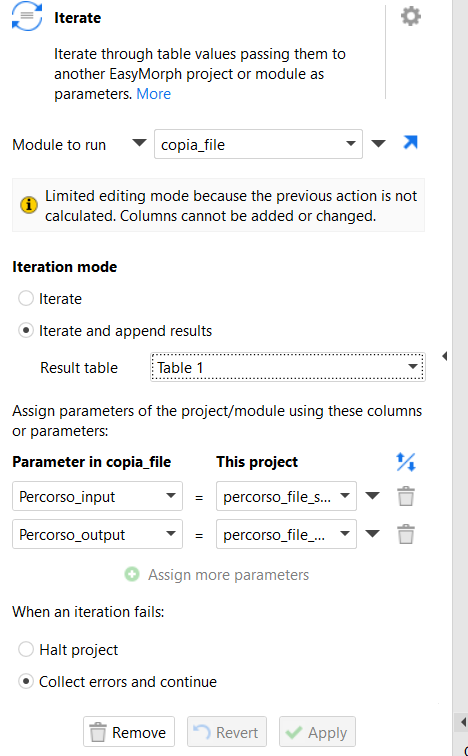
I have an iterate command that passes the name and file to a module. The module performs a move for each file passed to a default path. I'd like to send an email summary of what was moved, but I can't.
I'll show you the iterate command and the mail command I placed after iterate, but it only sends the headers.